
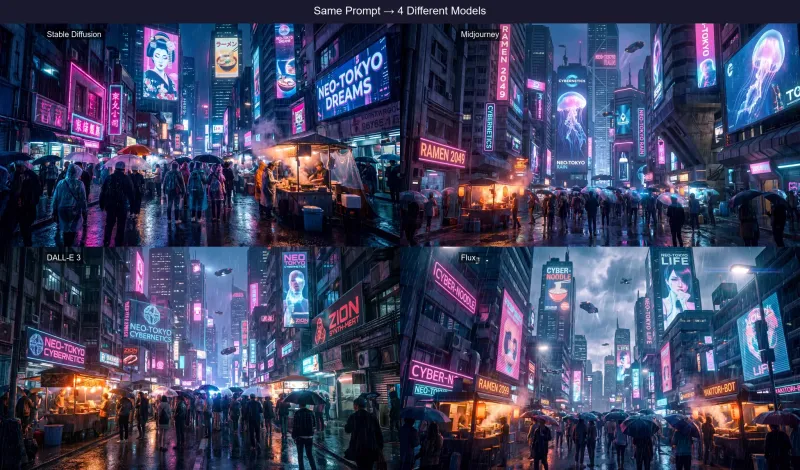

How Stable Diffusion Prompts Differ from Other Models
Stable Diffusion's prompt syntax is the most technical among popular AI image generators. Unlike Midjourney's clean comma-separated style or DALL-E 3's natural sentences, SD prompts use a weighted token system with parentheses notation. This gives you fine-grained control over every element of the image — but requires knowing the syntax.
(masterpiece:1.2), (ultra-detailed:1.1), cinematic photograph, lone warrior in ancient ruins, dramatic side lighting, volumetric fog, depth of field, (sharp focus:1.1), 8k resolution

Negative: (worst quality:1.4), (bad anatomy:1.3), blurry, watermark, text, low resolution, duplicate, mutated hands
Understanding Weighted Syntax
The (term:weight) syntax is Stable Diffusion's most powerful feature. Weights above 1.0 increase a token's influence on the output; weights below 1.0 reduce it. The practical range is 0.5 to 1.5 — going too high causes artifacts, going too low makes the term ineffective.
(masterpiece:1.2)(subject:1.1)(bad anatomy:1.3)[term](term:0.9) for subtle de-emphasis.SD 1.5 vs SDXL vs SD 3.5: Which Should You Use?
SD 1.5 is the most widely supported checkpoint with thousands of community fine-tunes (LoRAs, embeddings). Prompts need more explicit quality tags and negative prompts. SDXL produces much higher resolution natively (1024×1024 base) and understands more natural language, needing fewer quality tokens. SD 3.5 is the newest architecture with dramatically improved prompt adherence and human anatomy, using a text-to-image diffusion transformer that handles complex compositions far better than earlier versions.
Our generator outputs prompts that work across all three. The core descriptors and weighted syntax are universally compatible, while quality tags are calibrated for the best results in SDXL and SD 3.5.
The Importance of Negative Prompts
Unlike Midjourney or DALL-E 3, Stable Diffusion relies heavily on negative prompts to avoid common generation artifacts. Without a proper negative prompt, SD images frequently exhibit distorted anatomy, watermarks, low-quality rendering, and compositional issues. Our generator automatically produces a negative prompt section targeting the specific weaknesses most likely to appear given your image's content and style.
Checkpoint Compatibility
The generated prompts are compatible with the most popular SD checkpoints: Realistic Vision, DreamShaper, Deliberate, SDXL Base 1.0, Juggernaut XL, and RealVisXL. For anime-style images, the generator adjusts vocabulary toward tokens recognized by checkpoints like AnythingV5 and CounterfeitXL.
5 Ready-to-Paste Stable Diffusion Prompts
Copy these directly into AUTOMATIC1111, ComfyUI, or any SD-compatible interface:
(masterpiece:1.3), (photorealistic:1.4), cinematic portrait of a young woman, golden hour lighting, shallow depth of field, Fujifilm XT3, 85mm f/1.4, film grain, (sharp focus:1.2), 8k uhd
Negative: (worst quality:1.4), (bad anatomy:1.3), blurry, watermark, text, deformed
(masterpiece:1.2), (ultra-detailed:1.1), epic fantasy landscape, floating islands above clouds, bioluminescent waterfalls, ethereal blue-green lighting, matte painting style, (dramatic sky:1.3), cinematic wide angle
Negative: (low quality:1.4), blurry, text, watermark, ugly, (bad composition:1.2)
(best quality:1.3), professional product photography, luxury watch on marble surface, studio lighting, soft shadows, (hyperrealistic:1.2), macro lens, shallow DOF, clean background, 8k
Negative: (worst quality:1.4), blurry, noise, text, watermark, logo
(masterpiece:1.4), (best quality:1.2), 1girl, fantasy warrior, ornate armor, flowing cape, dynamic pose, glowing magical sword, (detailed face:1.2), intricate details, vibrant colors, anime style
Negative: (worst quality:1.4), (bad anatomy:1.4), bad hands, blurry, extra fingers, mutated
(photorealistic:1.3), modern minimalist house, floor-to-ceiling windows, infinity pool, mountain backdrop, golden hour, (architectural photography:1.2), wide angle lens, clean lines, 8k resolution
Negative: (low quality:1.4), blurry, distorted, text, watermark, people
Frequently Asked Questions
Does this generate negative prompts for Stable Diffusion?
Yes. The generator produces a dedicated negative prompt section with standard SD quality terms like (worst quality:1.4), (bad anatomy:1.3), blurry, watermark, plus content-specific negatives identified from your image to prevent common artifacts.
Does it work with SDXL and SD 3.5?
Yes. The generator outputs prompts compatible with SD 1.5, SDXL, and SD 3.5. SDXL and SD 3.5 understand more natural language, so prompts work slightly differently — our generator uses the appropriate vocabulary and weight ranges for each version.
What weight syntax does the prompt use?
Stable Diffusion uses parentheses with decimal weights: (term:1.2) increases emphasis, (term:0.8) reduces it. Our generator applies weights intelligently — critical style and quality terms like (masterpiece:1.2) get higher weights, while secondary descriptors stay at 1.0.
Can I use these prompts with ComfyUI or Automatic1111?
Yes. The generated prompts use standard SD syntax that works in both Automatic1111 and ComfyUI. Just paste the positive prompt into the prompt field and the negative prompt into the negative prompt field.

