 Image
ImageLexica and ImageToPrompt are both useful tools for AI art practitioners, but they operate on completely different foundations. Lexica is a search engine for AI-generated images — it helps you find existing prompts that other people used. ImageToPrompt is a generator — it analyzes your specific image and creates a brand-new prompt for you. If you've been wondering which one to use, the answer usually comes down to whether you have an image you want to work from, or whether you're still in the discovery phase.
Quick Verdict: Starting from an image you own or found → ImageToPrompt. Searching for what's already been created in Stable Diffusion → Lexica.
What Is Each Tool?
Lexica is an AI art search engine built specifically around Stable Diffusion. It has indexed millions of SD-generated images along with the exact prompts used to create them. You can search by text (type "neon samurai portrait") or by image (upload a reference and find visually similar results). When you find an image you like, you can see and copy the prompt that created it. Lexica also has its own generation feature (Lexica Aperture) powered by a fine-tuned SD model, but its core value is the searchable prompt library.
ImageToPrompt is an AI-powered tool that accepts any image and generates model-specific prompts using Claude AI. It analyzes composition, lighting, color palette, mood, style, and subject matter, then produces optimized prompts for 7 different AI models: Midjourney, Stable Diffusion, Flux, DALL-E 3, Adobe Firefly, Leonardo AI, and Ideogram. It works from your images — not from a pre-existing library — and requires no login or account.
Feature Comparison
| Feature | ImageToPrompt | Lexica |
|---|---|---|
| Primary function | Image → Prompt (reverse engineering) | Search SD prompt library |
| Model support | 7 models (MJ, SD, Flux, DALL-E, Firefly, Leonardo, Ideogram) | Stable Diffusion only |
| Works from YOUR image | ✅ Yes — generates new prompt | Partial — finds similar existing images |
| Midjourney support | ✅ Yes | ❌ No |
| Flux AI support | ✅ Yes | ❌ No |
| Price | Free | Free (paid generation credits) |
| Login required | ❌ No | No (account for saving/generating) |
| Negative prompts | ✅ Yes (SD) | Manual |
| Output languages | 10 languages | English only |
| Color palette analysis | ✅ Yes | ❌ No |
| Model-specific syntax | ✅ Auto-generated | ❌ Generic SD only |
| Mobile friendly | ✅ Yes | ✅ Yes |
When to Use ImageToPrompt
ImageToPrompt is the right choice in these scenarios:
- You have a specific reference image: Whether it's a mood board photo, a painting you admire, or a screenshot from a film, ImageToPrompt can analyze any image and generate prompts calibrated to reproduce that exact aesthetic across multiple AI models.
- You need multi-model prompts: Lexica is entirely Stable Diffusion-focused. If you want prompts for Midjourney, Flux, DALL-E 3, or Firefly — none of which Lexica supports — ImageToPrompt is the only option in this comparison.
- You want model-specific syntax automatically: ImageToPrompt handles the
--arand--v 6.1parameters for Midjourney, negative prompt formatting for SD, and natural language structure for Flux — without you needing to know the conventions of each model.
When to Use Lexica
Lexica excels in these specific situations:
- You want to explore what's possible with Stable Diffusion: Lexica's library is massive and well-indexed. If you want to see the full range of what SD can produce in a given style, there's no better place to browse.
- You found a beautiful SD image and want its prompt: Many sites display AI-generated images without the prompt. If you can find the same image on Lexica, you can get the exact generation parameters. This makes it useful as an image-matching detective tool.
- You're learning Stable Diffusion prompt vocabulary: Seeing thousands of real prompts alongside their outputs is one of the best ways to understand what words and phrases actually affect SD output. Lexica is a great learning resource for SD practitioners.
The Core Limitation of Lexica for Multi-Model Users
Lexica's biggest constraint in 2026 is that it's entirely built around Stable Diffusion, a model that — while still powerful — is one of several major players in AI image generation. If your workflow involves Midjourney V6.1, Flux Pro, or DALL-E 3, Lexica has nothing to offer you. Its prompt library was built for SD syntax, and those prompts won't transfer cleanly to other models without significant rewriting.
ImageToPrompt was designed from the ground up to handle this multi-model reality. When you upload an image, you get not just a generic description but a prompt specifically formatted for each model's strengths and syntax conventions.
Verdict
If you work primarily with Stable Diffusion and enjoy browsing and discovering existing work, Lexica is a valuable resource. Its search functionality and massive library are genuinely useful. But it's a search tool, not a generation tool — it can't take your image and tell you how to recreate it in Midjourney or Flux.
ImageToPrompt is the stronger choice for most users in 2026 because it works with any image, supports 7 models, and generates prompts rather than just retrieving them. For anyone who isn't exclusively a Stable Diffusion user, ImageToPrompt provides far more practical value.
From Photo to Prompt — A Real Example
Here's what happens when you upload a reference photo to ImageToPrompt. The original image is analyzed and reproduced across multiple AI models — something Lexica can only approximate by searching its database for similar images:

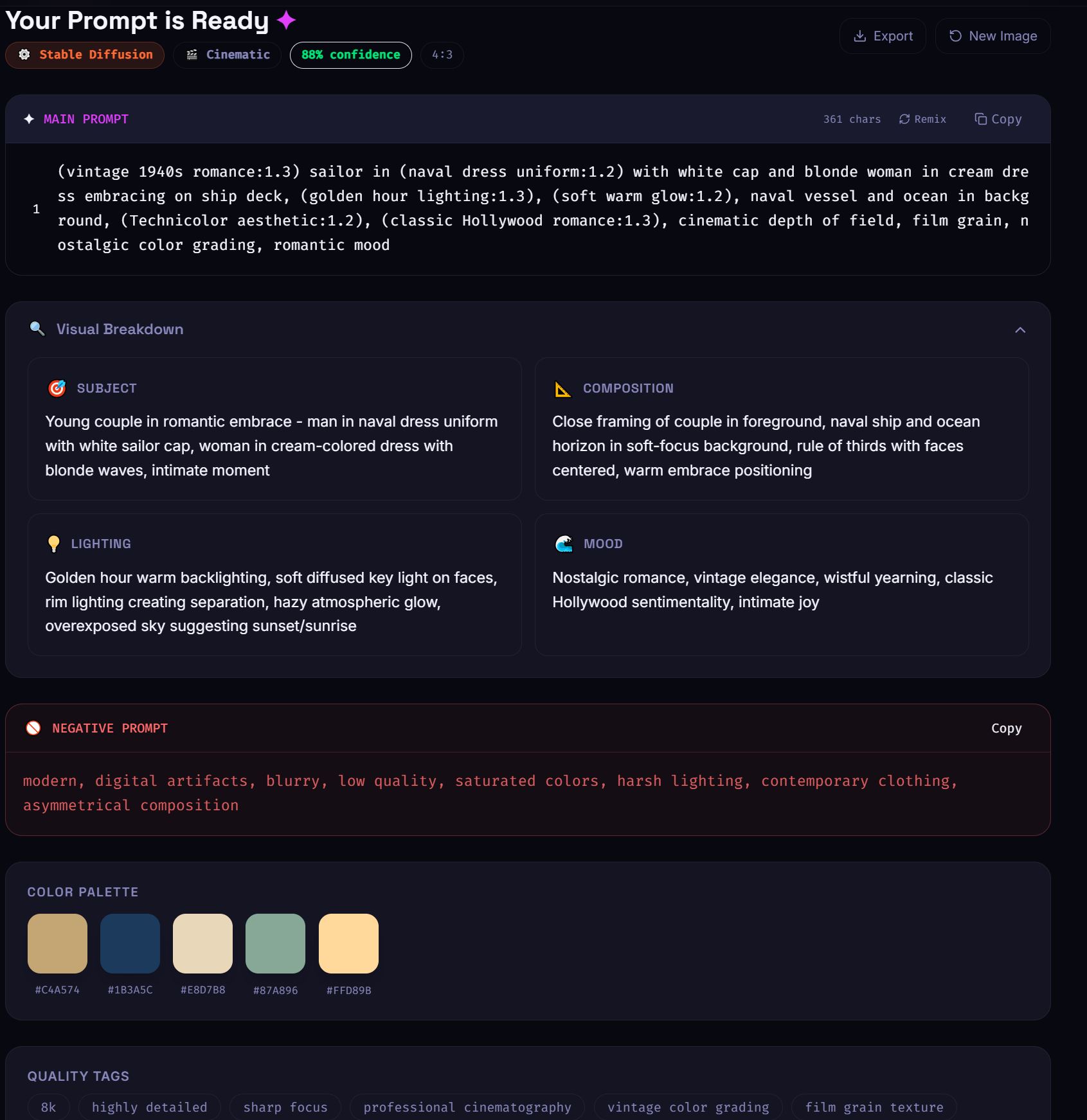

Upload → analyze → recreate. Lexica works in the opposite direction: you search existing images to find prompts.
Try ImageToPrompt Free
Upload any image and get optimized prompts for Midjourney, Flux, SD, DALL-E 3, and more — no login required.
Generate Prompts Free →Frequently Asked Questions
Does Lexica work for Midjourney?
No. Lexica is built around Stable Diffusion imagery only. Its database does not index Midjourney creations and it does not generate Midjourney-formatted prompts. For Midjourney prompts from your images, use ImageToPrompt, which supports Midjourney natively with proper --ar, --v 6.1, and --style raw parameters.
Can Lexica generate prompts from my photos?
No. Lexica's image search finds similar images within its existing database — it doesn't generate a new prompt based on your photo. ImageToPrompt is designed specifically to analyze any uploaded image and generate a new, model-optimized prompt from scratch.
Which is better for Flux prompts?
ImageToPrompt, without question. Lexica does not support Flux AI at all — its entire database is built around Stable Diffusion. ImageToPrompt supports Flux as one of its 7 models and generates Flux-specific prompts optimized for that model's natural language style and cinematic quality capabilities.